Hotel guest portal with QR room service. No app to install.
One QR code in every room opens your hotel in the guest's own language: order food to the room, ask for housekeeping, a taxi or a late check-out, book the spa and follow every request live. Reception sees it all on one screen.
The 14-day free trial includes the guest portal for the smallest room band.
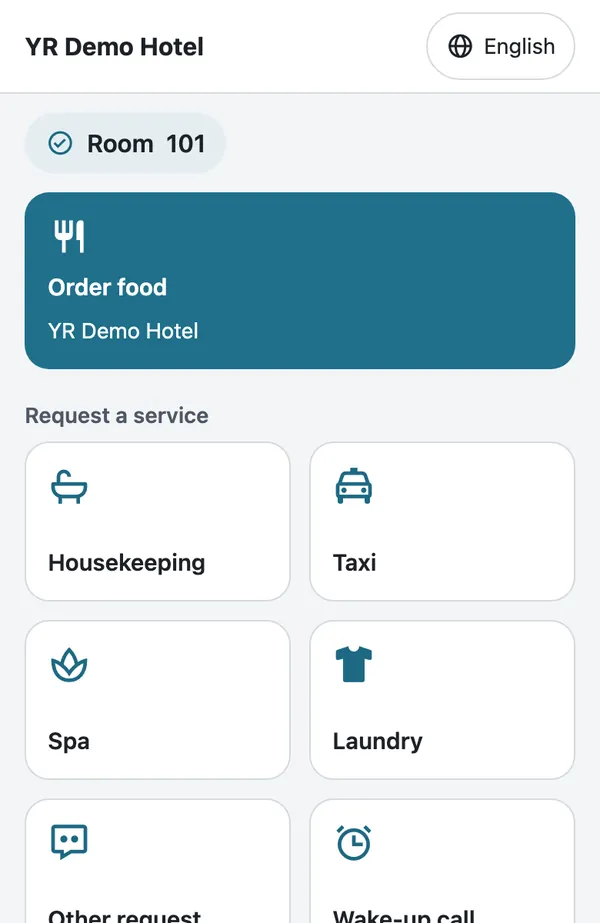
How does a QR guest portal work?
A hotel guest portal is a small website for your hotel that opens from a QR code in the room. Guests use it on their own phone, in their own language, without downloading an app or creating an account, and every request reaches your staff with the room number attached. In short: a hotel guest app with nothing to download, and a digital concierge for room service by QR code.
Print one QR per room
Add your rooms by range (101-130, 201-230), switch on the services you offer and print the ready-made QR sheet.
Guests scan and ask
The QR already knows the room. The guest picks a language, orders food or a service and watches the status change as your staff work on it.
Reception handles it
New requests reach the reception screen, the staff phone app and Telegram. Staff mark them seen, in progress or done, or propose another time.
What your guests can do from the room
Every request goes to the right person with the room number attached. Nothing to install, nothing to remember.
Room service, charged to the room
Guests order from your hotel restaurant, or from a restaurant you work with. The order is marked "Charged to room" and paid at check-out.
37 hotel services, your choice
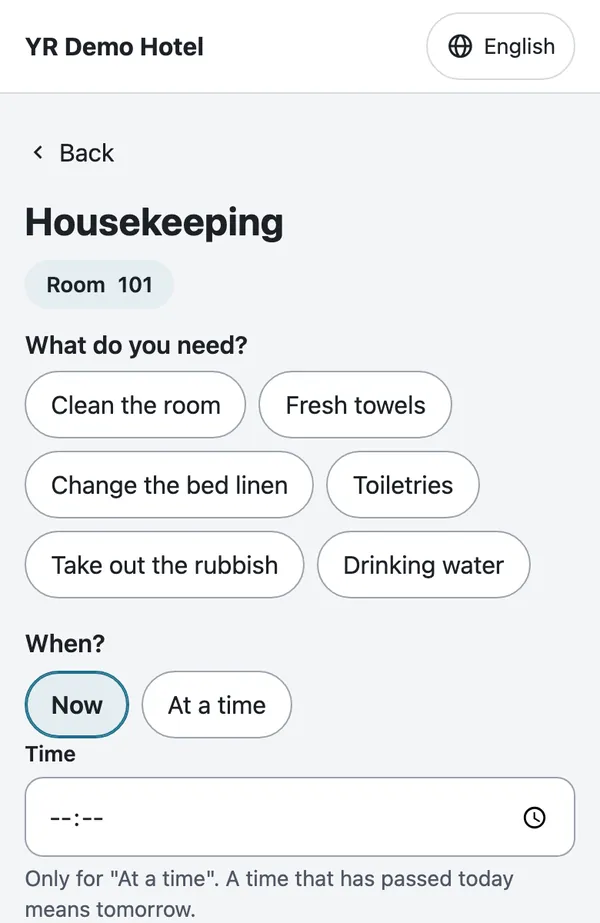
Housekeeping, extra towels, laundry, minibar, airport transfer, taxi, late check-out, a doctor and more. Switch on only the ones you offer.
Bookings with a time and people
Spa, massage, sauna, gym or pool: guests choose a time inside your opening hours and capacity.
Price lists with quantities
Laundry, minibar and breakfast in the room come with your own items, variants and prices.
Wake-up calls
Once or repeating on chosen days. Your staff get an alert to call the room when it is due.
Live status for every request
Sent, seen by reception, in progress, done. Guests can cancel a new request or accept another time that reception proposes.
16 languages, right to left included
The whole portal speaks the guest's language. Notes from reception can be translated automatically once you switch AI translation on.
Your hotel's look
Your brand colour on a clear, readable page, with your own list of services.
What reception sees
One screen for every request and every room order, on any phone, tablet or computer. It refreshes by itself.
Requests and room orders together
Open requests first, then room orders from the restaurant, each with its room number and time.
Status in one tap
Mark a request seen, in progress or done, propose another time or write a note to the guest.
Alerts where your staff are
Push notifications in the staff phone app and Telegram messages for new requests and for wake-up calls that are due.
Guest notes in your language
With AI translation on, a guest's note arrives translated into your hotel's language.
A reception login, not the keys
Give staff a reception seat: they see guest requests, not money or settings.
Monthly statement per vendor
Count and amount per month for the restaurant and every paid service. Close the month and export it to CSV.
Hotel and restaurant, even as two businesses
If the restaurant in your building is a separate company, link it by invitation. Room orders appear at your reception and in the monthly statement, so you can settle with the restaurant and add the orders to the guest's bill. Either side can end the link.
Ready in an afternoon
Rooms by range
Type 101-130 and the rooms exist. Switch a room off while it is being renovated.
Your services and prices
Turn services on and set the expected time, opening hours, a people limit and price lists.
Print the QR sheet
One QR per room, ready to print. Rotate the secret to make every old QR stop working at once.
Rooms instead of tables
Hotel mode changes the word "table" to "room" on the menu, the orders screen and the staff app.
Hotel guest portal: one price per room band
Everything in Pro plus the guest portal for your rooms, in one monthly price. Pick the band that covers your number of rooms.
Hotel 15
- Everything in Pro included
- Guest portal in 16 languages, no app
- Room service charged to the room
- Reception screen with phone and Telegram alerts
Hotel 40
- Everything in Pro included
- Guest portal in 16 languages, no app
- Room service charged to the room
- Reception screen with phone and Telegram alerts
Hotel 100
- Everything in Pro included
- Guest portal in 16 languages, no app
- Room service charged to the room
- Reception screen with phone and Telegram alerts
Hotel 200
- Everything in Pro included
- Guest portal in 16 languages, no app
- Room service charged to the room
- Reception screen with phone and Telegram alerts
The 14-day free trial includes the guest portal for up to 15 rooms.
Pay yearly and you pay for 10 months instead of 12.
More than 200 rooms? Ask us for a quote
Privacy built in
- No guest account and no app: a name and the room, and a phone number only where a service needs one.
- A guest sees and cancels only their own requests, never another room's.
- Room requests are deleted after 13 months, and 90 days after a hotel closes its account; monthly totals without personal data are kept.
- AI translation stays off until you switch it on.
Plus everything YR Menu does for your restaurant
The QR menu in 16 languages with 22 designs, photos and allergens, the staff phone app, table ordering and reservations come with Pro.
Hotel guest portal: questions and answers
Give every room a guest portal
Start the 14-day free trial, add your rooms and print the QR sheet today.